---
title: "Find and complete education: courses, collections & pathways"
description: Browse Violet's education hub, filter courses by patient population and format, complete and rate courses, and track your progress.
---
[Skip to content](https://help.joinviolet.com/providers-care-teams/find-and-complete-education#main-content)
[Request support](https://help.joinviolet.com/kb-tickets/new?hsLang=en)
[](https://help.joinviolet.com?hsLang=en)
- [Home](https://help.joinviolet.com/)
- Provider & Care Teams
Show submenu for Provider & Care Teams
- [Demo](https://help.joinviolet.com/general/about)
- [Details](https://help.joinviolet.com/providers-care-teams)
- Care Coordination
Show submenu for Care Coordination
- [Demo](https://help.joinviolet.com/provider-organizations/verified-inclusive-org-0)
- [Details](https://help.joinviolet.com/care-coordinators)
- Provider Organization Admins
Show submenu for Provider Organization Admins
- [Demo](https://help.joinviolet.com/provider-organizations/verified-inclusive-org-0-2)
- [Details](https://help.joinviolet.com/provider-organizations)
- Health Plans & Network Managers
Show submenu for Health Plans & Network Managers
- [Demo](https://help.joinviolet.com/provider-organizations/verified-inclusive-org-0-0)
- [Details](https://help.joinviolet.com/health-plans-provider-network-managers)
Open main navigation
Close main navigation
- [Home](https://help.joinviolet.com/)
- Provider & Care Teams
Show submenu for Provider & Care Teams
- [Demo](https://help.joinviolet.com/general/about)
- [Details](https://help.joinviolet.com/providers-care-teams)
- Care Coordination
Show submenu for Care Coordination
- [Demo](https://help.joinviolet.com/provider-organizations/verified-inclusive-org-0)
- [Details](https://help.joinviolet.com/care-coordinators)
- Provider Organization Admins
Show submenu for Provider Organization Admins
- [Demo](https://help.joinviolet.com/provider-organizations/verified-inclusive-org-0-2)
- [Details](https://help.joinviolet.com/provider-organizations)
- Health Plans & Network Managers
Show submenu for Health Plans & Network Managers
- [Demo](https://help.joinviolet.com/provider-organizations/verified-inclusive-org-0-0)
- [Details](https://help.joinviolet.com/health-plans-provider-network-managers)
- [Request support](https://help.joinviolet.com/kb-tickets/new)
How can we help you?
- There are no suggestions because the search field is empty.
1. [Violet Help Center](https://help.joinviolet.com/?hsLang=en)
2. [Providers & Care Teams](https://help.joinviolet.com/providers-care-teams?hsLang=en)
3. [Education](https://help.joinviolet.com/providers-care-teams?hsLang=en#education)
# Find and complete education: courses, collections & pathways
## Browse the catalog, filter by community, and track your learning
Violet's education hub is where you build person-centered care skills — through curated collections, structured pathways, and a full catalog of accredited courses in text, audio, and video formats. This article shows you how to find the right education, complete it, and track your progress.
### Get oriented
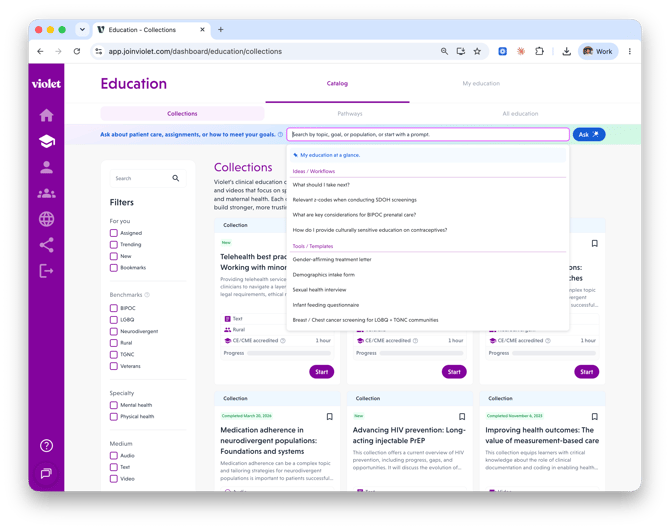
Select **Education** in the left-hand navigation. The hub is organized into:
- **Catalog** — **Collections**, **Pathways**, and **All education**.
- **My education** — **In-progress** and **Completions & certificates**.
You can also use the search bar — search by topic, goal, or population, or start with a prompt in plain language.
### Choose your format
- **Collections** — sets of courses mixing formats (text modules, podcasts, videos) focused on a specific patient population or care disparity. Most CE/CME credit on Violet is earned by completing collections.
- **Pathways** — structured learning tracks made up of multiple collections, starting with foundational concepts and progressing to advanced topics.
- **All education** — the full catalog, including Violet collections and curated third-party education.
### Filter to find the right course
Use the **Filters** panel to narrow the catalog:
- **For you** — *Assigned* (education your organization assigned to you), *Trending*, *New*, and *Bookmarks*.
- **Benchmarks** — select a patient population to see courses that count toward your progress in that Benchmark.
- **Specialty**, **Medium** (audio, text, video), **Accrediting organizations**, **Level** (Foundation through Advanced), and **Status**.
**Tip:** click the bookmark icon on any course or collection to save it for later, then use the *Bookmarks* filter to find it again.
### Start and complete a course
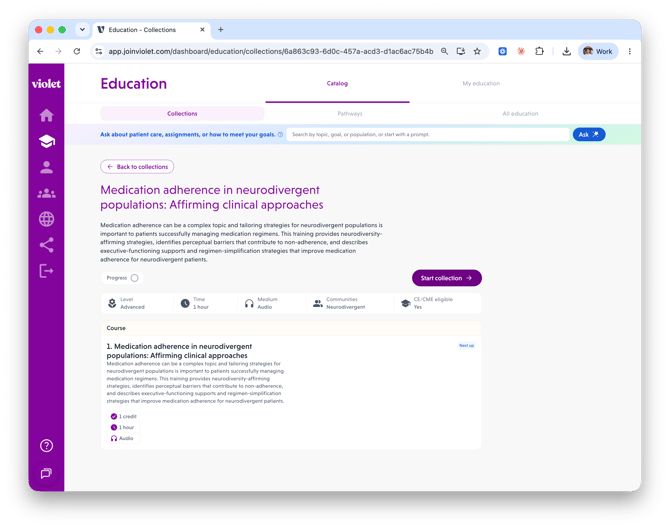
1. Open a collection and click **Start collection** (or **Resume** to pick up where you left off).
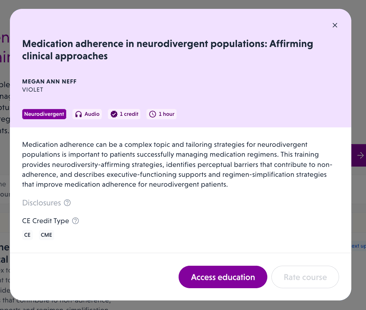
2. Click a course to see its details — educator, communities of focus, duration, credits, and disclosures — then click **Access education**. The course opens in a new tab.
3. When you've finished, return to Violet and click **Mark complete**. (Some interactive courses record completion automatically.)
4. Rate the course from 1 to 5 and click **Submit** — your feedback shapes Violet's catalog. The completion is added to your profile, and Violet suggests the next course in the collection.
### Track your progress
- **In-progress** (under My education) — everything you've started but not finished.
- **Completions & certificates** — every completed course and collection, with dates, credit hours, and certificate actions. Use the **View** switcher to flip between Collections and Courses.
- Progress bars on collection and pathway pages show how far along you are.
### Why it matters for your Benchmarks
Completed Violet education feeds directly into your Benchmark scoring. If you're working toward a specific community Benchmark, filter the catalog by that **Benchmark** — or click **Access education** from the Benchmark's requirements checklist on your dashboard to jump straight to qualifying courses.
### Related articles
- Completing your Violet profile and earning your Benchmarks
- Claiming CE/CME credit and managing your certificates
- [Overview](https://help.joinviolet.com/overview?hsLang=en#main-content)
- [Demo](https://help.joinviolet.com/overview?hsLang=en#demo)
- [Details](https://help.joinviolet.com/overview?hsLang=en#details)
- [Providers & Care Teams](https://help.joinviolet.com/providers-care-teams?hsLang=en#main-content)
- [Profile & Benchmarks](https://help.joinviolet.com/providers-care-teams?hsLang=en#profile-benchmarks)
- [CE/CME & Certificates](https://help.joinviolet.com/providers-care-teams?hsLang=en#ce-cme-certificates)
- [Education](https://help.joinviolet.com/providers-care-teams?hsLang=en#education)
- [Care Coordinators](https://help.joinviolet.com/care-coordinators?hsLang=en#main-content)
- [Demo](https://help.joinviolet.com/care-coordinators?hsLang=en#demo)
- [Getting Started](https://help.joinviolet.com/care-coordinators?hsLang=en#getting-started)
- [Provider Search](https://help.joinviolet.com/care-coordinators?hsLang=en#provider-search)
- [Provider organizations](https://help.joinviolet.com/provider-organizations?hsLang=en#main-content)
- [Demo](https://help.joinviolet.com/provider-organizations?hsLang=en#demo)
- [Insights & Reports](https://help.joinviolet.com/provider-organizations?hsLang=en#insights-reports)
- [Education & Engagement](https://help.joinviolet.com/provider-organizations?hsLang=en#education-engagement)
- [Team Management](https://help.joinviolet.com/provider-organizations?hsLang=en#team-management)
- [Health Plans & Provider Network Managers](https://help.joinviolet.com/health-plans-provider-network-managers?hsLang=en#main-content)
- [Demo](https://help.joinviolet.com/health-plans-provider-network-managers?hsLang=en#demo)
- [Network Insights](https://help.joinviolet.com/health-plans-provider-network-managers?hsLang=en#network-insights)
- [Provider Search](https://help.joinviolet.com/health-plans-provider-network-managers?hsLang=en#provider-search)
[](https://joinviolet.com)
Powering person-centered health care, everywhere.
[mailto:support@joinviolet.com](mailto:support@joinviolet.com)
Copyright © 2026, Violet Health