
Your Violet profile powers everything else on the platform: it generates your Violet Benchmarks, tailors your education recommendations, and lets you show up as a verified provider for person-centered care. This article walks through completing your profile, understanding your Benchmarks, and sharing them.
What are Violet Benchmarks?
Violet Benchmarks reflect your training, education, and experience caring for specific patient populations:
- BIPOC — Black, Indigenous, and People of Color
- LGBQ — Lesbian, Gay, Bisexual, and Queer
- TGNC — Transgender and Gender Non-Conforming
- Neurodivergent, Rural, and Veterans
For each community, Benchmarks are awarded at three levels based on how you compare to providers in your specialty:
- Awareness — awarded to providers in the top 50% of their specialty.
- Proficiency — top 25% of their specialty.
- Excellence — top 5% of their specialty.
Complete onboarding
When you first activate your account, Violet guides you through four sections: About you, Self-assessment, Education, and Work experience. Click Continue on each screen to move forward.
- About you — what brings you to Violet, your name and NPI (your NPI helps Violet recommend content tailored to your clinical background), and optional identity questions: gender identity, sexual orientation, other communities you identify with, languages you speak besides English, and race/ethnicity. Your identity responses are private to you — they're only ever shown to your organization in aggregate, never with your name.
- Self-assessment — pick up to 3 patient populations you're most interested in, then rate your confidence providing tailored care to each on a scale of 1–10.
- Education — list courses, training, or workshops from the past 5 years focused on the health care experiences of these communities. The fastest way: upload your certificates (JPG, PNG, or PDF up to 10 MB) and Violet auto-fills the details for you to review. You can also add entries manually, or skip and add them later.
- Work experience — add your clinical experience, including your current role. This step is required to submit your profile.
After you submit, you'll see "Profile submitted" and gain full access to your dashboard. Your Benchmarks are calculated shortly after — you'll receive them by email, and they appear on your dashboard.
See your Benchmarks on your dashboard
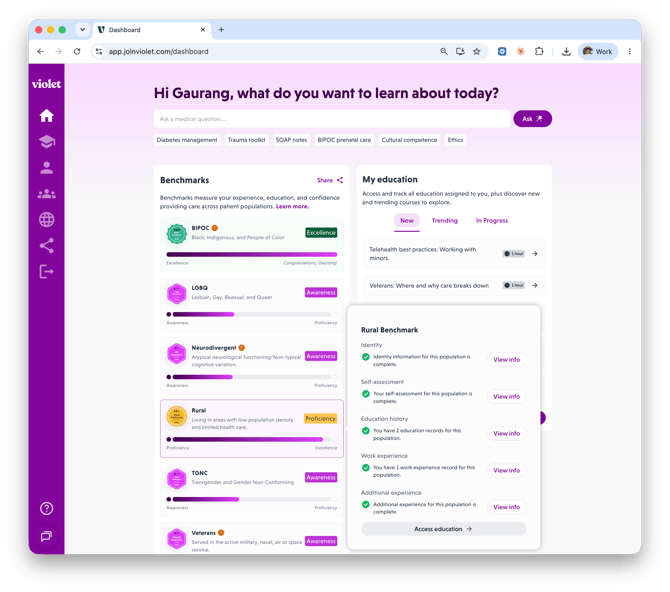
Your Benchmarks section on the Home dashboard shows a bar per community. Click any Benchmark to see exactly what feeds it — a checklist of Identity, Self-assessment, Education history, Work experience, and Additional experience — with Add info shortcuts to complete anything missing, and an Access education button that jumps to courses that count toward that Benchmark.
Keep your profile up to date
Your Benchmarks recalculate as your profile grows. Go to Profile in the left navigation to edit any section under Background:
- Identity & languages — languages, race/ethnicity, sexual orientation, gender identity, and community identities (veteran status, rural background, neurodivergent identity, and more).
- Self-assessment — update your confidence ratings and experience for each community.
- Work experience, Education, and Additional experience — clinical roles, outside training (with certificate upload to auto-fill), and teaching, research, advocacy, or volunteer work that informs your care.
After changes, you may see an Updates pending badge — your Benchmarks will update within 24 hours to reflect recent activity or profile changes.
Share your Benchmarks
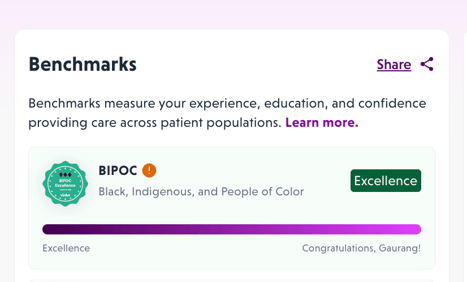
- On your dashboard's Benchmarks section, click Share.
- Choose a tab:
- LinkedIn — select one Benchmark and click Share Benchmark, then Open LinkedIn. Your Violet Verified Provider badge is pre-populated as a certification; be sure to click save on LinkedIn.
- HTML — select one or more Benchmarks and click Generate code block to get an embed code for adding your badge(s) to your personal website.
Related articles
- Finding and completing education: courses, collections & pathways
- Claiming CE/CME credit and managing your certificates