
Violet's accredited collections earn you CE/CME credit — and your certificate is available instantly after a short evaluation. This article covers claiming credit, downloading certificates, and adding outside CE certificates to your profile.
How CE/CME credit works on Violet
Credit is earned by completing accredited collections (look for the CE/CME accredited tag, which lists the approved accrediting organizations and credit amounts). Violet supports certificates across professional groups accredited by organizations including AMA (physicians), ANCC (nursing), AAPA (physician associates), APA (psychology), ASWB (social work), ACPE (pharmacy), ADA CERP (dentistry), CDR (dietetics), and NBCC (counseling).
Claim credit after completing a collection
- Complete every course in an accredited collection. When you finish, Violet shows "You've earned CE/CME credit."
- Click Begin evaluation. (You can also claim any time later — the Claim CE/CME credit button appears on the collection page and next to the collection in My education > Completions & certificates.)
- Answer the short 4-part evaluation: whether the learning objectives were met, the quality of the content, how it will affect your practice, and any planned practice changes and feedback. Your progress is saved if you need to step away.
- Click Submit.
Generate your certificate
- After the evaluation, select the accrediting organization for your professional group.
- Fill in the requested details — your name, city, and state, plus a license number or date of birth if your accrediting body requires it (for example, pharmacy certificates ask for your NABP number).
- Click Get certificate, then Download now.
Your certificate is also stored permanently in My education > Completions & certificates, where you can re-download it any time from the Download action next to the collection.
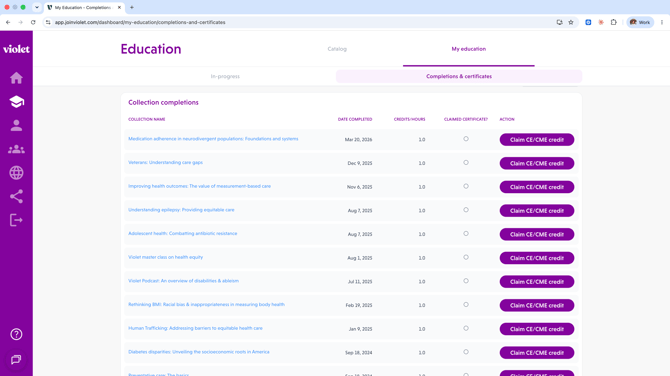
Review all your completions
The Completions & certificates page lists every completed collection with its completion date, credits/hours, and whether you've claimed the certificate — plus a Courses view for individual course completions. It's your one-stop record for license renewal season.
Add outside CE certificates to your profile
Training you completed outside Violet counts toward your Benchmarks too. To add it:
- Go to Profile > Background > Education.
- Drag your certificate files onto Upload certificate(s) to autofill — JPG, PNG, or PDF, up to 10 MB each. Violet reads each certificate and drafts an entry with the organization, course, credits, and year pre-filled.
- Review each draft, add the Communities of Focus the education covered, and save. (You can also click Add manually to type an entry from scratch.)
Saved education feeds your Benchmark scoring — you'll see an Updates pending badge, and your Benchmarks update within 24 hours.
Related articles
- Finding and completing education: courses, collections & pathways
- Completing your Violet profile and earning your Benchmarks