
Violet gives organization admins an objective, benchmarked view of their team's capacity to deliver person-centered care — and shareable reports to showcase it. This article explains the Overview dashboard, Violet Verified Organization status, the Insights pages, and how to download reports.
The Overview dashboard
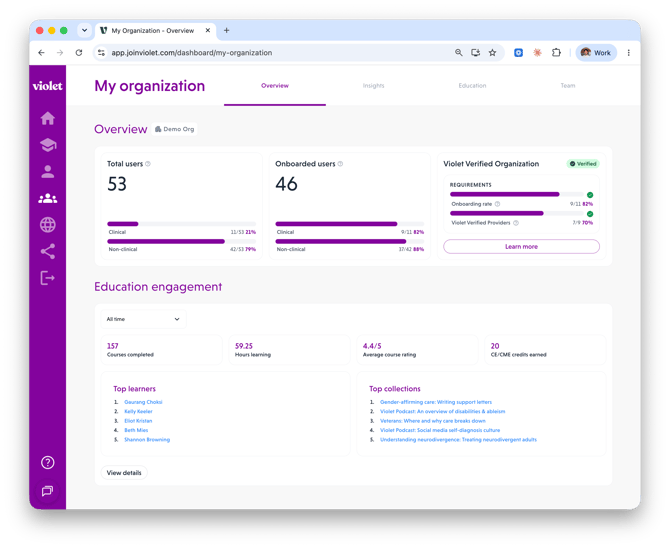
Select My organization in the left-hand navigation to land on Overview. It shows:
- Total users — clinical and non-clinical users linked to your organization, from your roster or third-party data.
- Onboarded users — users who have accepted their invite and completed their profiles. Clinical users' profiles are what generate their Benchmarks, so this number drives everything else.
- Violet Verified Organization — your verification status and progress toward the requirements (see below).
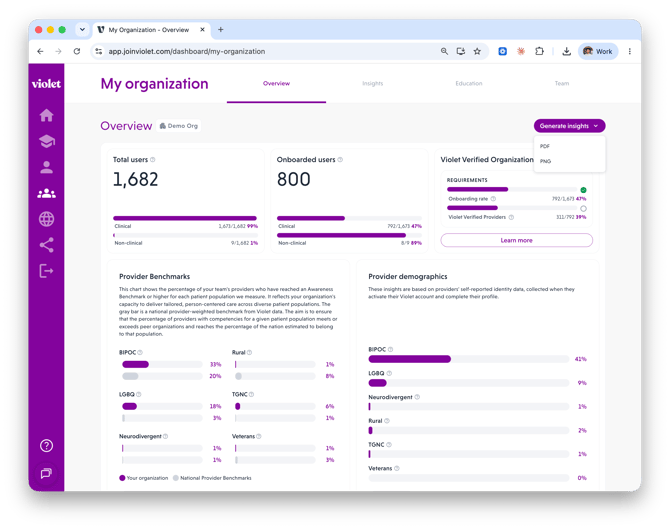
- Provider Benchmarks chart — the percentage of your providers who have reached an Awareness Benchmark or higher for each patient population Violet measures.
- Provider demographics — insights based on providers' self-reported identity data.
- Education engagement summary — courses completed, hours learning, average course rating, CE/CME credits earned, top learners, and top collections.
Violet Verified Organization (VVO) status
Violet Verified Organization status recognizes organizations that have demonstrated their commitment to person-centered care. The criteria:
- At least 30% of clinical staff (licensed professionals, pre-licensed individuals, and interns) have onboarded with Violet and submitted profiles to receive Benchmarks.
- Of those staff, at least 40% have reached an Awareness Benchmark for one or more patient populations.
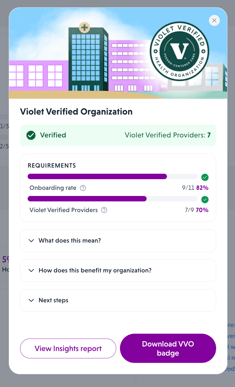
On the Overview page, the Violet Verified Organization card shows a Verified or Not verified badge and a Requirements tracker with two meters: your Onboarding rate and your Violet Verified Providers count (this second requirement unlocks once the onboarding threshold is met). Click Learn more for what verification means, how it benefits your organization — from value-based care conversations to payer negotiations and RFPs — and concrete next steps if you're not verified yet.
Verified organizations can download their VVO badge from the Learn more dialog to use in accordance with Violet's badge licensing guidelines.
The fastest path to verification: get more of your clinical team onboarded. Use invite reminders on the Team page (see "Adding and managing your team on Violet"), and encourage providers to fully complete their profiles.
Provider Benchmarks (Insights)
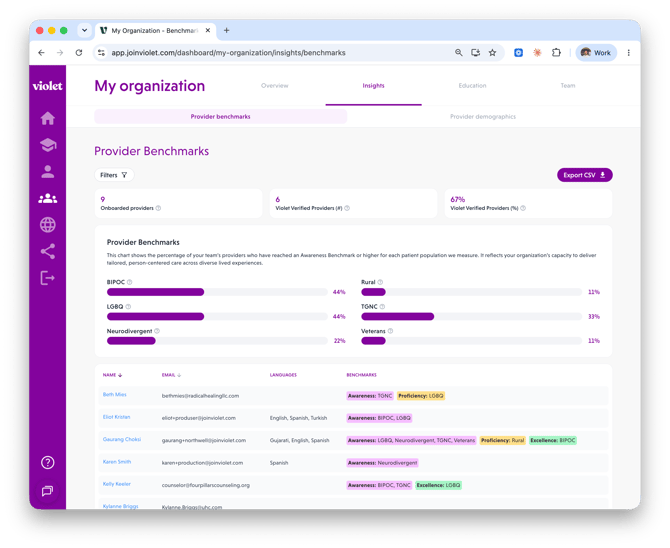
Go to My organization > Insights > Provider benchmarks for the detailed view:
- Tiles for Onboarded providers and Violet Verified Providers (count and percentage). A Violet Verified Provider is an onboarded provider who has reached at least the Awareness Benchmark in one or more patient populations.
- The Provider Benchmarks chart across patient populations (BIPOC, LGBQ, TGNC, Neurodivergent, Rural, Veterans).
- A provider-level table with each onboarded provider's languages and earned Benchmarks. Filter by name, language, or Benchmark community.
Provider demographics (Insights)
Go to Insights > Provider demographics to see aggregated, self-reported team data across four cards: Race & ethnicity, Gender identity, Sexual orientation, and Care delivery languages. You can filter to clinical or non-clinical users and export the data as a spreadsheet.
Privacy note: to protect individual privacy, demographic insights only display once your organization has 30 or more users. Below that threshold you'll see "No data available."
Download and share reports
- Insights report (Inclusivity Scorecard): from the Overview page, click Generate insights and choose PDF or PNG. The report packages your Provider Benchmarks, team overview and demographics, and quality-improvement metrics (courses completed, hours learned, CE/CME credits) into a single shareable document.
- Education engagement CSV: from Education > Education engagement, click Export CSV.
- Team roster CSV: from Team, click Actions > Export CSV.
Related articles
- Adding and managing your team on Violet
- Assigning education and tracking your team's engagement