
As a care coordinator or navigator, you can use Violet's Care Coordination search to quickly find providers who match a patient's clinical needs, language, location, and community — and copy their details straight into your referral workflow.
Open the Care Coordination search
- Sign in to Violet at app.joinviolet.com.
- In the left-hand navigation, select Care Coordination.
Option 1: Search in plain language (AI search)
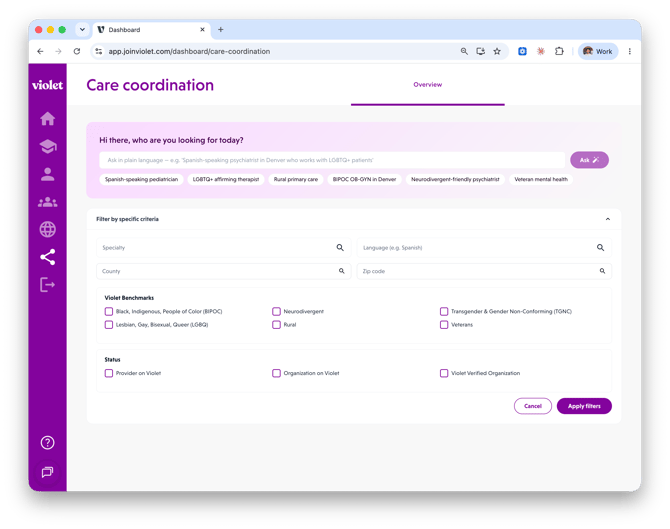
The fastest way to search is to describe who you're looking for the way you'd say it out loud.
- In the search bar at the top of the page, type a plain-language request — for example: "Spanish-speaking psychiatrist in Denver who works with LGBTQ+ patients."
- Click Ask.
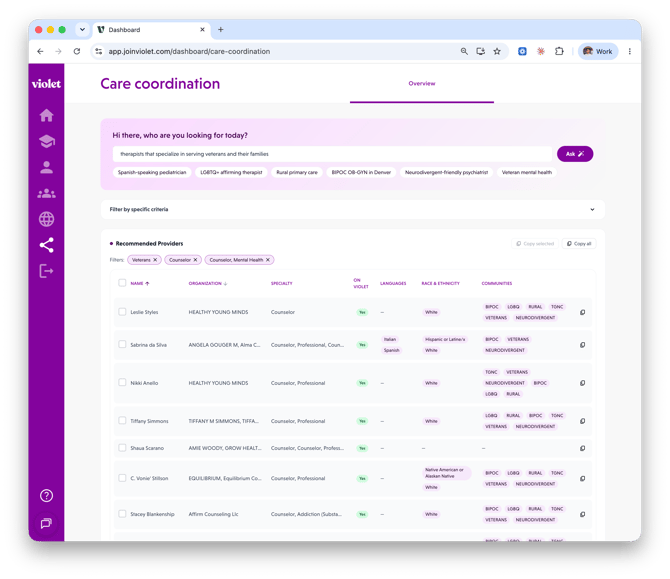
- Violet interprets your request and automatically applies the matching filters (specialty, language, location, community). The filters it inferred appear as removable pills above your results, so you can always see — and adjust — exactly how the list was built.
Tip: Not sure where to start? Click one of the preset chips under the search bar — such as Spanish-speaking pediatrician, LGBTQ+ affirming therapist, Rural primary care, or Veteran mental health — to run a common search in one click.
If Violet can't confidently interpret your request, you'll see a banner suggesting you mention a specialty, language, or community. Rephrase your search or use the manual filters below.
Option 2: Filter by specific criteria
For precise control, use the manual filters instead.
- Click Filter by specific criteria to expand the filter panel.
- Set any combination of:
- Specialty — start typing and pick from the list (for example, Psychiatry or Pediatrics).
- Language — for example, Spanish.
- County or Zip code — to narrow by location.
- Under Violet Benchmarks, check the communities your patient identifies with to find providers with verified cultural competence for that community:
- Black, Indigenous, People of Color (BIPOC)
- Lesbian, Gay, Bisexual, Queer (LGBQ)
- Transgender & Gender Non-Conforming (TGNC)
- Neurodivergent
- Rural
- Veterans
- Under Status, you can additionally require:
- Provider on Violet — the provider has an active Violet account.
- Organization on Violet — the provider's organization uses Violet.
- Violet Verified Organization — the organization has met Violet's verification criteria for inclusive care.
- Click Apply filters.
Work with your results
Matching providers appear in the Recommended Providers table. You can:
- Sort the table by clicking a column header.
- Remove a filter by clicking the X on any filter pill above the table — results update immediately.
- Page through longer result sets using the pagination controls under the table.
If no providers match, try removing a filter — very specific combinations (for example, one zip code plus multiple communities) can narrow the list to zero.
Copy provider details for a referral
You don't need to retype anything into your EHR, spreadsheet, or messaging tool:
- Select the checkbox next to each provider you want to share, then click Copy selected — or click Copy all to copy the whole result list (up to 500 providers).
- You'll see a "Copied to clipboard" confirmation.
- Paste anywhere. Each provider is copied as a tidy text block including their name, specialty, organization, languages, race & ethnicity, verified communities, and whether they're on Violet.
You can also copy a single provider directly from their row in the table.
Related articles
- Understanding Violet Benchmarks and badges in provider search results
- Getting set up: onboarding and education for care coordination teams